

Shater EA is one of the more interesting multi-currency grid strategies available for MetaTrader 4 — it monitors several pairs simultaneously rather than running one trick on EURUSD, and it coordinates entries across pairs, which most multi-pair EAs never even attempt. Whether that coordination actually succeeds depends heavily on your broker’s execution quality. This review covers how the grid-averaging strategy works, what the reported test data shows, and the one setting you should change before going live.
| TL;DR | |
|---|---|
| Product | Shater EA (version 3.0) |
| Platform | MetaTrader 4 |
| Pairs / timeframe | AUDUSD, EURCHF, GBPUSD — H1, 24/7 operation |
| Strategy type | Grid averaging with ATR-based entries and interval-based grid orders (default 150 pips on 5-digit quotes) |
| Key caveat | Aggressive grid recovery: during the August 2024 JPY flash crash the grid went 8 layers deep — cap max grid levels at 3 |

What Is Shater EA and How Does Its Strategy Work?
Shater EA combines a grid-averaging recovery mechanism with standard MT4 indicators — mainly multiple ATR readings — to enter and scale into positions systematically.
Grid averaging is a strategy where a system opens additional orders at predefined price intervals while a position is in drawdown, lowering the average entry price so a modest price reversal can close the whole basket at a combined profit.
ATR (Average True Range) is a volatility indicator that measures the average size of a market’s recent price ranges; ATR-based signals scale entry and exit distances to current volatility instead of using fixed pip values.
Concretely, per the vendor’s description:
- Entries: ATR-based signals determine optimal entry points.
- Grid construction: when the market moves into drawdown, subsequent orders open at predefined intervals — the default is 150 pips on 5-digit quotes.
- Closing: once the overall basket profit target is reached, the entire grid closes together, capturing the volatility swing.
- Customization: grid spacing, lot size (fixed or dynamic), and ATR optimization are all adjustable.
How Does Shater EA Compare to Other Grid EAs?
Shater’s distinguishing feature is ATR-driven spacing plus coordinated multi-pair monitoring — but its recovery depth is what separates it from safer designs.
| Dimension | Shater EA | Typical martingale grid | Pure trend EA |
|---|---|---|---|
| Entry logic | ATR-based signals | Fixed pip distance | Indicator/trend signals |
| Drawdown handling | Grid averaging at intervals (default 150 pips) | Lot-size doubling (martingale) | Fixed stop-loss, no averaging |
| Multi-pair coordination | Yes — coordinated entries across pairs | Usually same strategy run independently per chart | Rare |
| Worst-case risk | Deep grid layers in one-sided markets | Margin call from doubled lots | Controlled by SL |
What Do the Reported Test Results Show?
The published results are reported figures from backtests and monitored accounts — not independently audited numbers — so read them as evidence of design intent, not guaranteed performance.
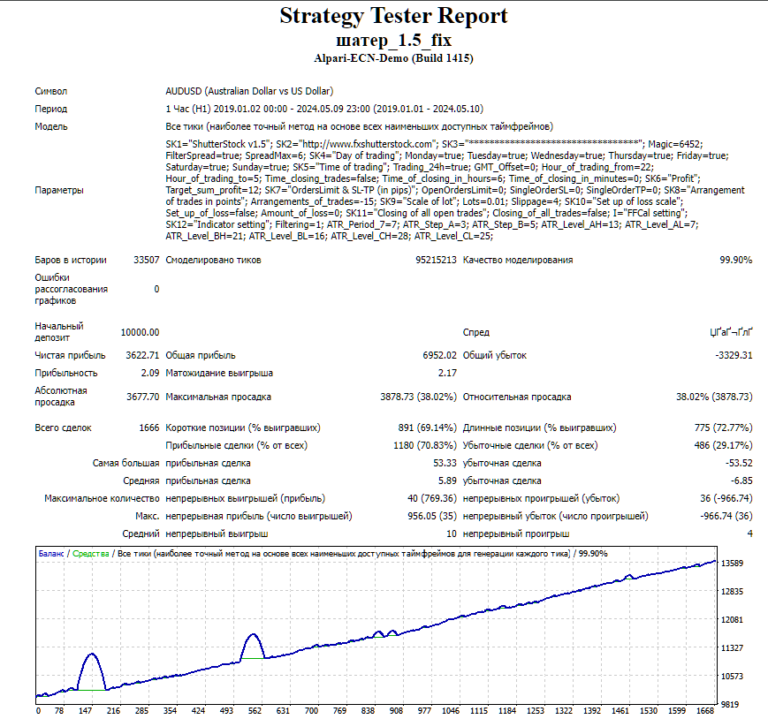
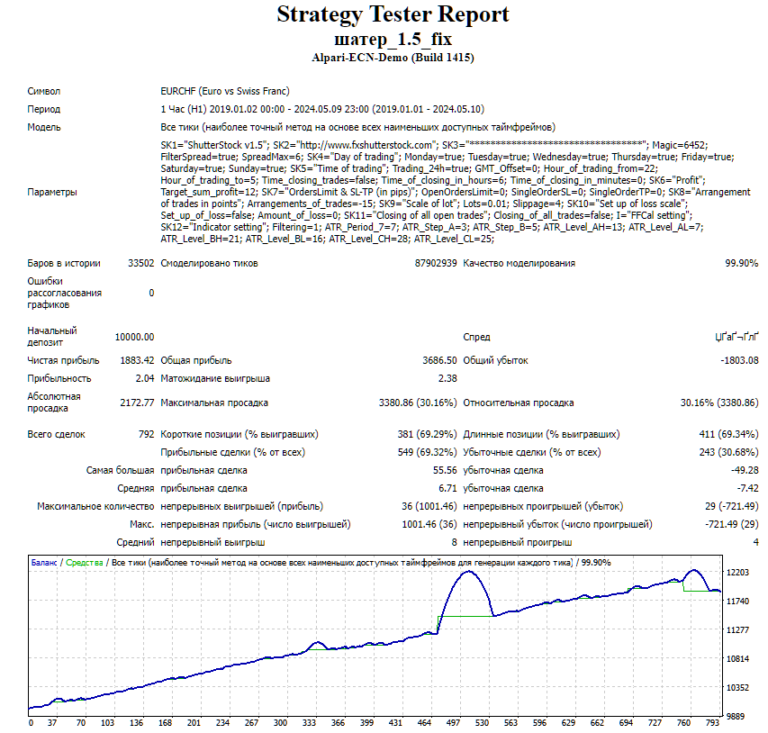
- Backtests: due to MT4 platform limitations, each pair was tested separately from January 1, 2019 to October 5, 2024; both EURCHF and GBPUSD reportedly achieved acceptable profits.
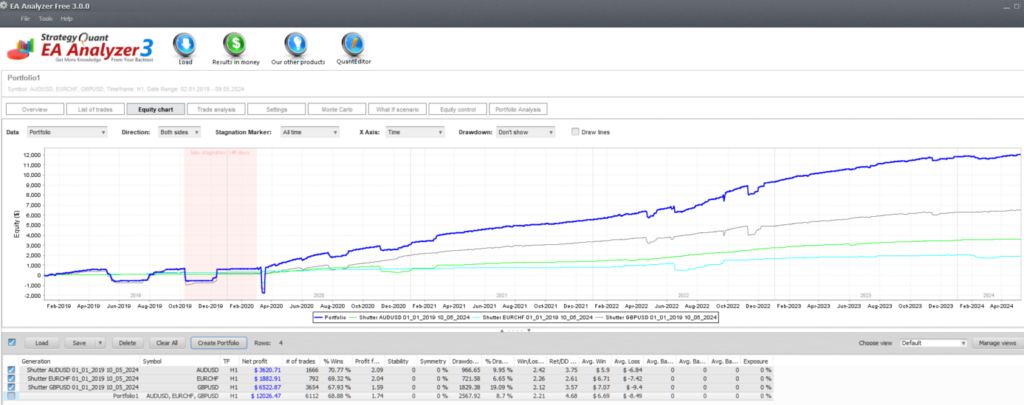
- Portfolio analysis: the combined portfolio run through EA Analyzer reportedly shows continuous growth since April 2020. Complete backtest files are available via the forum thread.
- Live monitoring: Myfxbook-monitored accounts on AUDUSD and GBPUSD reportedly show stable returns with occasional pauses for technical adjustments.
- Seasonality: across 2022–2024 the system was reportedly most efficient in summer and at the end of the year.
- By pair: GBPUSD reportedly delivered the highest returns, AUDUSD was the most stable, and EURCHF was relatively weak.
Shater Portfolio from EA Analyzer:
Which Parameters Should You Configure?
Version 3.0 exposes a deep parameter set, and the defaults are not the safest starting point.
- Execution: magic number, spread filter, trading hours, forced-closure timers.
- Grid: order spacing and maximum number of open orders.
- Risk: stop-loss per order and maximum drawdown threshold.
- Lots: fixed or dynamic sizing; configurable profit targets.
- ATR: filtering levels and period adjustments.
Before deploying any configuration to live trading, test it fully in the MT4 Strategy Tester.
Is Shater EA Safe to Run on a Live Account?
Only with conservative settings — the grid recovery mode is its biggest strength and its biggest risk at the same time.
⚠️ Heads Up: Shater EA’s grid recovery mode is aggressive. Even with a trend filter reducing float loss, during the Aug 2024 JPY flash crash the grid went 8 layers deep. Set max grid levels to 3 in the settings — don’t leave it at default.
Important risk warnings:
- In a one-sided market, continuous grid averaging can rapidly increase holding cost — if the trend stays unfavorable, losses expand and can deplete the account balance.
- Historical backtests and live monitoring, however positive, cannot guarantee future returns; market conditions can change and invalidate the strategy.
- Use conservative lot sizes and leverage; prioritize GBPUSD and AUDUSD (the stronger reported performers); check drawdown regularly and adjust during high-volatility periods.
- Study grid and martingale-style strategies in depth so you understand exactly what risk you are carrying.
Installation is straightforward: attach the EA to your MT4 chart, click “Load” in the settings window to import the pre-configured .set file from the archive, and confirm. RoboForex and IC Markets are the brokers the vendor recommends. If you are new to Forex EAs, study an “Automated Forex Trading” basics course first.
Risk Warning: the Forex market is inherently uncertain, and exchange rates are affected by global economic data, political events, and geopolitical conflicts. Shater EA’s grid strategy carries real tail risk — make sure your risk tolerance matches what a deep grid layer can do to an account before you trade it live.
Used with capped grid depth and honest expectations, Shater EA is a genuinely systematic tool for multi-currency exposure; used with defaults and hope, it is a slow-motion account drain waiting for the next flash crash.


