

The Bands Sniper indicator implements dynamic support and resistance using an envelope + TMA (Triangular Moving Average) combination — a concept that is sound in theory and, in practice, actually draws levels that make sense on the chart. The TMA-based approach is genuinely elegant: TMA smooths out noise better than an SMA while keeping lag acceptable, and the resulting envelope bands give you dynamic S/R levels you can plan trades around. This review covers how it works, where it shines, and the timeframe settings that make or break it.
| TL;DR | |
|---|---|
| Product | Bands Sniper Indicator (free download) |
| Function | Draws dynamic support/resistance levels via TMA-smoothed envelope bands, with arrow entry signals |
| Markets | Forex, stocks, commodities, crypto, precious metals, energy (oil and gas) |
| Best for | Swing and intraday traders on H4/Daily who want visual S/R levels with alerts |
| Key caveat | Stable on H4/Daily but noisy on M15 and below — lengthen the TMA smoothing period (try 1.5x default) and only trade the arrows, not band touches |
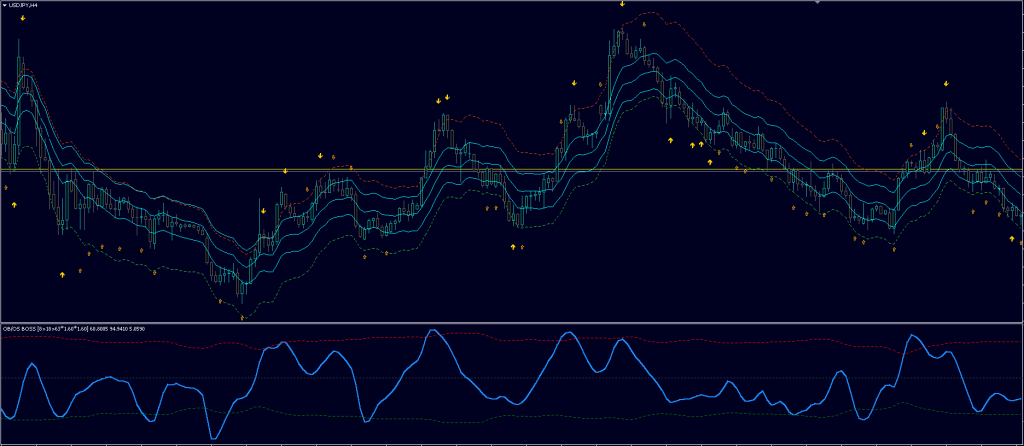
What Is the Bands Sniper Indicator?
Bands Sniper is a free MT4 indicator that draws dynamic support and resistance levels using envelope bands calculated from a TMA baseline, plus arrow signals at actionable levels.
Dynamic support and resistance are price levels that move with the market rather than sitting at fixed horizontal prices — usually calculated from moving averages or envelope bands — so they adapt as trends develop.
A TMA (Triangular Moving Average) is a double-smoothed moving average that weights prices around the center of its lookback window, filtering short-term noise more aggressively than a simple moving average at the cost of slightly more lag.
How Does Bands Sniper Compare to Static Support and Resistance?
Static lines go stale the moment a trend begins; the TMA envelope approach keeps levels relevant as the market moves — with one known weakness on fast timeframes.
| Dimension | Bands Sniper (dynamic S/R) | Static horizontal S/R lines |
|---|---|---|
| Level placement | Recalculates with the trend via TMA envelope | Fixed at historic swing points |
| Trending markets | Levels track the move | Lines quickly become irrelevant |
| Ranging markets | Bands flatten into useful boundaries | Also works well |
| Lag | Acceptable with TMA smoothing | None (historical) |
| Best timeframes | H4/Daily (noisy on M15 and below by default) | Any |
What Are the Indicator’s Key Features?
Three strengths define the tool: breadth of markets, ease of use, and a flexible alert system.
Unparalleled Versatility
The indicator isn’t confined to one asset class: it can be applied across forex pairs, stocks, commodities, cryptocurrencies, precious metals, and energy resources like oil and gas. For traders with diversified portfolios, that means consistent analysis across different markets.
Intuitive User Experience
The visual cues and straightforward signal generation mean you don’t need to be a technical analysis expert to interpret the data — a glance at the chart is enough to identify potential opportunities, even for newer traders.
Customizable Alert System
Alerts can arrive via mobile notifications, platform pop-ups, or email, so you never miss a signal — particularly useful if you manage multiple charts or trade on the go.
How Should You Use the Bands Sniper Indicator Effectively?
Treat it as one layer of a complete strategy, not a standalone signal machine.
- Combine analyses: confirm its signals with trend lines, moving averages, and oscillators, and use fundamental analysis for broader market context.
- Practice on demo first: a risk-free environment lets you learn the indicator’s behavior across market conditions and refine your strategy before risking real money.
Where Should You Place Take-Profit and Stop-Loss Levels?
The indicator offers concrete starting guidelines — adjust them to your risk tolerance and the market you trade:
- Take-profit: the suggested targets are the middle band line and the opposite band — areas where price may reverse or hit meaningful resistance.
- Stop-loss: set it a few pips beyond the generated arrows — below for buy signals, above for sell signals.
Where Can You Download Bands Sniper?
The indicator is free, and the site also offers trading courses, expert advisors, and a community forum for traders who want to go deeper.
Download Bands Sniper Indicator (free)
⚠️ The Issue: This indicator is stable on H4/Daily but noisy on M15 and below. The issue is the TMA smoothing period — the default is too short for lower timeframes. Try 1.5x the default period. Also, only use the arrow signals as entries — don’t trade band touches alone.
Risk note: no trading tool is infallible. Trading involves substantial risk, past performance does not guarantee future results, and every signal should be tested on a demo account before live use.
The Bands Sniper indicator is a well-designed, user-friendly way to trade dynamic support and resistance — combine it with other analysis and sound risk management, and it’s a valuable addition to any trader’s toolkit.


