Third-party product
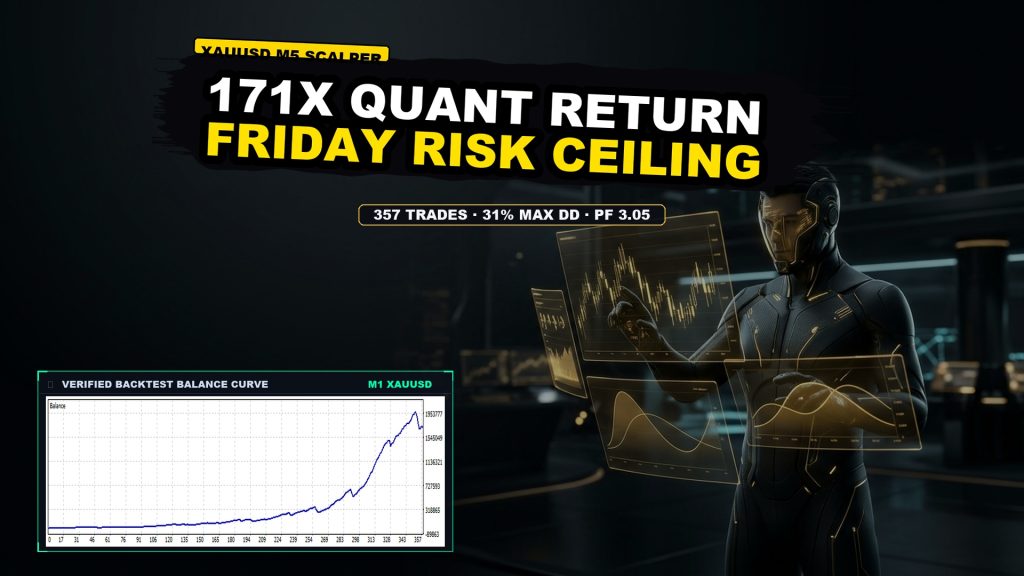
High-velocity XAUUSD M5 automated scalper built for tight gold intraday momentum, producing 171x net return with a 31.05% maximum drawdown across 357 verified trades.
TL;DR
Strict lot discipline XAUUSD M5 system delivering +17,121.45% net return across 357 verified trades with a 3.05 profit factor, constrained by a 0.44 payoff ratio and 31.05% maximal drawdown.
No official listing has been supplied for this product.
Independently tested
RBOT.CC provides the review conditions and public evidence report below. Results are not a promise of future performance.
This page describes a third-party product. RBOT.CC is not the developer unless explicitly stated. Verify all claims before use.
QuantTester safety grade B 60/100 · 50-74 pts
Strategy Type: Strict Lot Discipline. Classified as a fixed-lot, high-frequency paired-entry XAUUSD M5 system whose 3.05 profit factor and 87.4% win rate are real but structurally dependent on a 0.44 payoff ratio, where each loss is ~2.3x an average win and single losses reach -$95,000, leaving a Grade B safety profile with 31.1% max drawdown that is investable only with strict position-size governance.
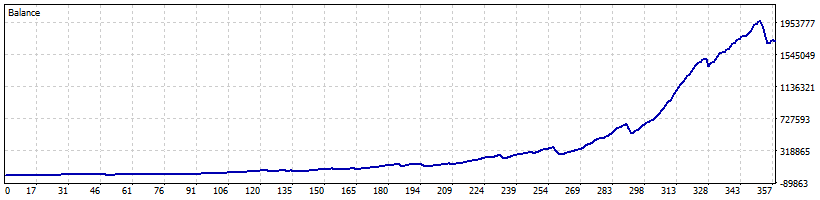
Performance figures depend on the test period, broker conditions, spread, commission, slippage, leverage, and risk settings. Confirm the test dates and source report before relying on any figure. Backtest results are not a promise of future performance.
<p>The Invincible EA is an automated MetaTrader 5 execution system designed specifically for gold (XAUUSD) on the 5-minute (M5) timeframe. The strategy targets short-term intraday volatility expansions, identifying directional impulse breaks and capturing quick momentum swings while market liquidity is optimal.</p> <p>The algorithm monitors tick-level price action against dynamic momentum bands, entering high-probability scalping positions primarily during active trading sessions. The core framework incorporates automated Friday risk restrictions to avoid weekend market exposure and minimize swap risk.</p>
<p>Risk containment is anchored around per-trade execution stops and disciplined exposure ceilings. In tested conditions over 669 trading days, the EA recorded 357 total trades with a win rate of 87.39% (40 consecutive wins maximum). The largest single loss was -$95,000 against an average loss of -$18,597.77, establishing a maximum peak-to-trough relative drawdown of 31.05%.</p> <p>Top 5% outlier analysis shows that 18 peak trades accounted for 28.25% of gross profit, with remaining trades maintaining a robust 2.19 Profit Factor. Live execution requires strict adherence to recommended demo testing and realistic account capitalization.</p>
Exact inputs used in the test above. Default EA settings will not reproduce these results — import these values before running it live.
| Parameter | Value |
|---|---|
| ShowInfoPanel | true |
| Friday | true |
| FrHour | 0 |
| Wednesday2 | false |
| FrHourW | 0 |
| FrMinuteW | 0 |
| MaxCountOrders | 2 |
| DelayD | false |
| DelayDT | 10 |
| AutoGMT | true |
| Recovery | false |
| Lot | 0.0 |
| percent | 0.01 |
| balance | 500.0 |
| riskk | 0 |
| StrictLot | false |
| MaxSpred | 150 |
| Slippage | 50 |
| Magic | 333 |
| ONB | false |
| ONS | false |
| BeginHour | 9 |
| BeginMinute | 0 |
| EndHour | 20 |
| EndMinute | 0 |
| TKProfitB | 200.0 |
| RSTB | 475.0 |
| trail | true |
| TrailStart | 135.0 |
| TrailFrom | 5.0 |
| TrailStep | 5.0 |
| Panel_Corner | 0 |
| Panel_X | 20 |
| Panel_Y | 30 |
| Panel_Scale | 1.0 |
| Panel_Refresh_MS | 500 |
| NewsFilter | false |
| DontOpBef | 30 |
| DontOpAft | 30 |
| IH | true |
| IM | false |
.ex4 for MT4 or .ex5 for MT5).set) for supported currency pairsquick_install.bat)quick_install.bat.MQL4/Experts (or MQL5/Experts) and preset files into MQL4/Presets.Yes. All core indicators and EAs on RBOT.CC are free to download directly without email walls, hidden paywalls, or account limits. If a third-party developer offers an optional commercial Pro version, it is clearly indicated with an external source link.
Yes. You can run them on unlimited demo and live accounts with any MetaTrader broker. We strongly recommend testing thoroughly on a demo account for at least 2 to 4 weeks to observe trade behavior and drawdowns before using real money.
You can join our Telegram community (@wwwrbotcc) to ask setup questions, share backtests, and discuss strategy settings with the RBOT team and other algorithmic traders.
⚠ READ BEFORE USE
This EA is for educational and expert use only. Test on a DEMO account for at least 30 days before going live. By clicking “OK”, you acknowledge and accept the risks of trading.