Third-party product
Neural recovery grid on XAUUSD H1: 6,013 trades, profit factor 25.26, 99.77% win rate and 9% maximum equity drawdown.
TL;DR
99.77% win rate and profit factor 25.26 are the grid talking, not the model: 14 losing trades carried the whole loss side and equity drawdown ran four times deeper than balance drawdown.
No official listing has been supplied for this product.
Independently tested
RBOT.CC provides the review conditions and public evidence report below. Results are not a promise of future performance.
This page describes a third-party product. RBOT.CC is not the developer unless explicitly stated. Verify all claims before use.
QuantTester safety grade A+ 95/100 · 90-100 pts
Classified as Hybrid (Tiered Basket + Trend Following): SmartChoise V9.7 on XAUUSD H1 produced a 99.77% win rate with 25.26 profit factor and 9.0% maximum drawdown across 6,013 trades (671 days), where 8 digit-concentrated large winners carry the gross profit, avg win ($31) to avg loss (-$533) is 0.06, and 359-point gap losses are the structural tail; an exceptional backtest that must be re-validated under real execution costs before capital allocation.
Performance figures depend on the test period, broker conditions, spread, commission, slippage, leverage, and risk settings. Confirm the test dates and source report before relying on any figure. Backtest results are not a promise of future performance.
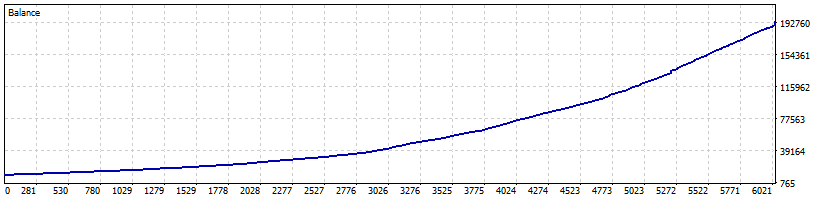
SmartChoise V9.7 trades a recovery grid driven by its neural-network signal layer: when a position goes against it the EA adds up to ten recovery levels and closes the whole chain on a small net profit. The tested run used risk level 1 with safe mode and adaptive risk control both off, and configured no take profit, no stop-loss level and no hard stop. It closed 6,013 trades in 671 days with an average holding time of about an hour.
A 99.77% win rate over 6,013 trades is the signature of a recovery grid rather than a predictive edge: 14 losing trades carried the entire loss side, and the largest single loss at 2,093 points is more than half the largest win at 3,997. Maximum equity drawdown reached 9% while balance drawdown stayed at 2%, which is the profile of floating losses hidden until a chain closes, and with no stop-loss and no hard stop configured the tail is decided by how deep the ladder runs before margin is exhausted.
Exact inputs used in the test above. Default EA settings will not reproduce these results — import these values before running it live.
| Parameter | Value |
|---|---|
| riskLevel | 1 |
| TradingStyle | 0 |
| safeMode | false |
| AdaptiveRiskControl | false |
| MaxSpread | 0 |
| CustomBalance | 0.0 |
| AllowHigherCustomBalance | false |
| DynamicCustomBalance | 0.0 |
| Recovery | 10 |
| MinRecoveryDistance | 0 |
| MaxRecoveryDistance | 0 |
| FixRecoveryDistance | 0 |
| FixDistanceMultiplier | 1.0 |
| RecoveryLotSizeMultiplier | 1.0 |
| MinProfitThreshold | 0.0 |
| RecoverySpacingType | 0 |
| RecoveryTPType | 0 |
| DailyLimitPercent | 0.0 |
| DailyType | 0 |
| WeeklyLimitPercent | 0.0 |
| WeeklyType | 0 |
| HardStopPercentPerEA | 0.0 |
| HardStopPercent | 0.0 |
| PauseOnHS | false |
| EqStop | 0.0 |
| MaxOpenTrades | 0 |
| AllowOneGlobalTrade | false |
| TakeProfit | 0 |
| StopLossLevel | 0 |
| PauseAfterSLHit | 0 |
| MaxTradeDrawdownPercent | 0.0 |
| LockMaxDD | false |
| PauseOnMaxTradeDD | 0 |
| MaxTradeDelay | 0.0 |
| TradeTimeoutMinutes | 0 |
| TradeTimeoutProfitThreshold | 0.0 |
| AutoMinProfitMultiplier | 1.0 |
| MinProfit | 0.0 |
| WaitForBetterProfit | false |
| BreakEven | 0.0 |
| GlobalTakeProfit | 0.0 |
| AdaptiveProfitScaling | false |
| InpProfitReductionDelayMin | 0 |
| InpProfitReductionStepMin | 0 |
| InpProfitReductionType | 1 |
| InpProfitReductionValue | 0.0 |
| StartAfterRecoveryTrades | 0 |
| MinNetProfitForReduction | 0.0 |
| OldestCloseStyle | 0 |
| LotSizeMultiplier | 1.0 |
| MaxAutoLotSize | 0.0 |
| LotSize | 0.0 |
| FixedPercentage | 0.0 |
| FixedPercentageEq | 0.0 |
| InpEquityStep | 0 |
| InpLotPerStep | 0.0 |
| TradesToTrail | 0 |
| InpMasterMN | 0 |
| InpDDType | 0 |
| InpDDValue | 0.0 |
| InpOneChainAtATime | false |
| SignalConfirmationType | 0 |
| SignalConfirmationValue | 100.0 |
| SignalConfirmationTimeoutMinutes | 15 |
| SignalConfirmationMode | 0 |
| SignalPullbackMinPoints | 0.0 |
| SignalConfirmationMaxDriftPoints | 0.0 |
| LowNews | false |
| MedNews | false |
| HighNews | false |
| NewsBuffer | 60 |
| UTCOffset | 0 |
| FridayStopHour | 0 |
| MaxTradesPerDay | 0 |
| DailyProfitTarget | 0.0 |
| DailyProfitPercent | 0.0 |
| useNeuralNetwork | true |
| TrendMode | 0 |
| useSupportResistance | false |
| useCandlePatternStrategy | false |
| useTrendStrategy | false |
| usePriceStrategy | false |
| TradeDirection | 0 |
| MagicNumber | 777777 |
| SimpleTradeComment | false |
| AccountType | 0 |
| EqSource | 0 |
| IncludeCredit | false |
| stopsType | 1 |
| noMarginLimit | false |
| ShowPanel | true |
| AllowManualTrades | true |
| ShowLogs | false |
| InpNotifySLTPHit | false |
| InpNotifyLimits | false |
| InpNotityTargets | false |
| InpNotifyDD | false |
| BacktestMode | 0 |
| InpTrailStart1 | 0 |
| InpTrailDist1 | 0 |
| InpTrailStep1 | 0 |
| InpTrailStart2 | 0 |
| InpTrailDist2 | 0 |
| InpTrailStep2 | 0 |
| InpTrailStart3 | 0 |
| InpTrailDist3 | 0 |
| InpTrailStep3 | 0 |
.ex4 for MT4 or .ex5 for MT5).set) for supported currency pairsquick_install.bat)quick_install.bat.MQL4/Experts (or MQL5/Experts) and preset files into MQL4/Presets.Yes. All core indicators and EAs on RBOT.CC are free to download directly without email walls, hidden paywalls, or account limits. If a third-party developer offers an optional commercial Pro version, it is clearly indicated with an external source link.
Yes. You can run them on unlimited demo and live accounts with any MetaTrader broker. We strongly recommend testing thoroughly on a demo account for at least 2 to 4 weeks to observe trade behavior and drawdowns before using real money.
You can join our Telegram community (@wwwrbotcc) to ask setup questions, share backtests, and discuss strategy settings with the RBOT team and other algorithmic traders.
⚠ READ BEFORE USE
This EA is for educational and expert use only. Test on a DEMO account for at least 30 days before going live. By clicking “OK”, you acknowledge and accept the risks of trading.