
Third-party product
MT5 Intraday Gold Breakout EA — M5 XAUUSD
No official listing has been supplied for this product.
Independently tested
RBOT.CC provides the review conditions and public evidence report below. Results are not a promise of future performance.
This page describes a third-party product. RBOT.CC is not the developer unless explicitly stated. Verify all claims before use.
QuantTester safety grade A 80/100 · 75-89 pts
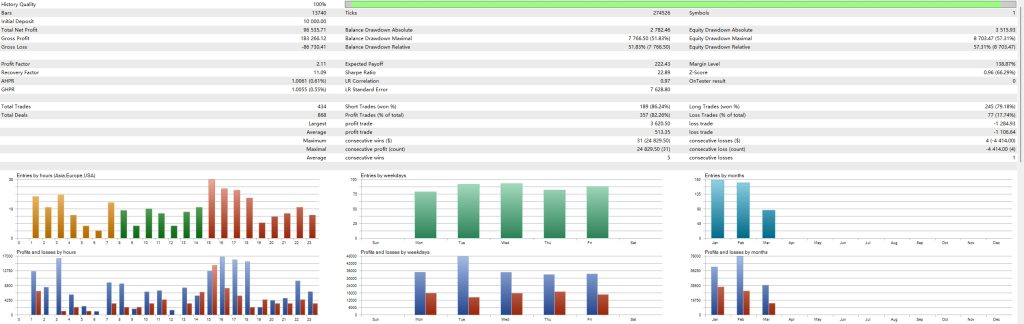
Strategy Type: Strict Lot Discipline. Classified as Strict Lot Discipline: The EA's fixed 0.01-lot execution, clustered fixed stop-loss exits (81.7% of losses near the 11.00 level), and a 1.43 profit factor with a post-top-5% PF of 1.11 demonstrate a structurally sound, outlier-tolerant scalping model, but the sub-0.6 payoff ratio and reliance on a 77.65% win rate create a fragile expectancy that is fully dependent on continued high hit rates and low market friction.
Performance figures depend on the test period, broker conditions, spread, commission, slippage, leverage, and risk settings. Confirm the test dates and source report before relying on any figure. Backtest results are not a promise of future performance.
Gold GPT EA M5 identifies breakout opportunities on the XAUUSD M5 chart using a combination of price action analysis and GPT-processed market signals. The system enters on confirmed breakouts with predetermined SL and TP levels, aiming for quick in-and-out captures. Every trade is closed within the trading day, removing overnight exposure and margin call risk entirely.
Fixed stop loss and take profit on every trade. No martingale, no grid, no dangerous compounding. Position sizing respects account balance to keep risk per trade under control. The EA monitors spread conditions and avoids trading during extreme volatility to reduce slippage risk.
Exact inputs used in the test above. Default EA settings will not reproduce these results — import these values before running it live.
| Parameter | Value |
|---|---|
| InpLotSize | 0.01 |
| InpStopLoss | 1100 |
| InpTakeProfit | 1100 |
| InpHideSLTP | false |
| InpHideTrailing | false |
| InpTrailingStart | 300 |
| InpTrailingStop | 200 |
| InpPivotBars | 5 |
| InpMinDistance | 200 |
| InpExpHours | 6 |
| InpMagic | 123456 |
| InpShowPanel | true |
| InpShowLevels | true |
| InpPanelColor | 5197615 |
| InpTextColor | 3329330 |
| InpUseRiskLot | false |
| InpRiskPercent | 1.0 |
| InpUseEquity | true |
| InpUseTimeFilter | false |
| InpStartHour | 0 |
| InpEndHour | 23 |
| InpCloseEndSession | true |
| InpCloseEndWeek | true |
| InpSessionEndHour | 22 |
quick_install.bat.MQL4/Experts (or MQL5/Experts) and preset files into MQL4/Presets.Yes. All core indicators and EAs on RBOT.CC are free to download directly without email walls, hidden paywalls, or account limits. If a third-party developer offers an optional commercial Pro version, it is clearly indicated with an external source link.
Yes. You can run them on unlimited demo and live accounts with any MetaTrader broker. We strongly recommend testing thoroughly on a demo account for at least 2 to 4 weeks to observe trade behavior and drawdowns before using real money.
You can join our Telegram community (@wwwrbotcc) to ask setup questions, share backtests, and discuss strategy settings with the RBOT team and other algorithmic traders.
⚠ READ BEFORE USE
This EA is for educational and expert use only. Test on a DEMO account for at least 30 days before going live. By clicking “OK”, you acknowledge and accept the risks of trading.