
Third-party product
Smart Gold Trading on MT5 — Structure Over Signals
TL;DR
MT5 EA for XAUUSD on M1 that reads market structure and enters only at key levels instead of chasing moves. Vendor-reported performance; not independently verified.
No official listing has been supplied for this product.
Independently tested
RBOT.CC provides the review conditions and public evidence report below. Results are not a promise of future performance.
This page describes a third-party product. RBOT.CC is not the developer unless explicitly stated. Verify all claims before use.
QuantTester safety grade A+ 98/100 · 90-100 pts
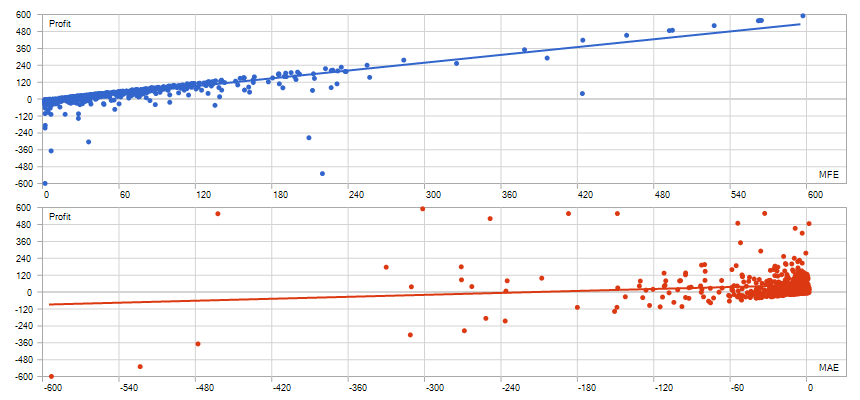
Strategy Type: Strict Lot Discipline. Classified as Single-Order Trend (discretionary trading): the strategy demonstrates a robust positive expectancy with a profit factor of 5.99, a payoff ratio of 2.28, and a maximum drawdown of only 5.91%, supported by a 473-day sample and a post-top-5% exclusion profit factor of 4.32, yielding a Strategy Safety Grade of A+.
Performance figures depend on the test period, broker conditions, spread, commission, slippage, leverage, and risk settings. Confirm the test dates and source report before relying on any figure. Backtest results are not a promise of future performance.
AXIO GOLD EA focuses on market structure analysis rather than fixed indicator signals. It evaluates support and resistance zones, the quality of price reactions at key levels, and the broader market environment before entering any trade. The system does not chase breakouts or rely on static crossover triggers. Instead, each setup is assessed on its structural merit — whether the current price action supports a valid entry, whether the response at key levels is strong enough, and whether the risk conditions remain favorable. During unclear or unfavorable conditions, the EA stays patient and waits for higher-probability setups.
AXIO GOLD does not use martingale, grid averaging, or any high-risk recovery techniques. Every trade is treated as an independent decision with predefined risk parameters. The system avoids forcing trades into the market and instead focuses on quality entries with disciplined position management. Drawdowns are managed through selective participation rather than aggressive scaling. This conservative approach aims to preserve capital during adverse conditions while capturing opportunities when the structural setup is favorable.
Exact inputs used in the test above. Default EA settings will not reproduce these results — import these values before running it live.
| Parameter | Value |
|---|---|
| LotMode | 2 |
| FixedLot | 0.01 |
| MaxLot | 1.0 |
| MinLot | 0.01 |
| UseFixedSL | true |
| FixedSL_Pips | 3500.0 |
| UseFixedTP | true |
| FixedTP_Pips | 3500.0 |
| EnableMagicRiskSL | false |
| MagicRiskSL_Pct | 10.0 |
| InpAccountUnitMode | 0 |
| DL_EnableATRGate | false |
| DL_ATRPeriod | 21 |
| DL_MinATRPts | 3.0 |
| EnablePropGates | false |
| PropOverrideEA_Risk | true |
| PropRiskPct | 0.2 |
| PropDailyLossPct | 5.0 |
| PropMaxDD_InitialPct | 20.0 |
| PropUnlockBufferPct | 0.5 |
| PropCooldownMin | 120 |
| PropCloseAllOnLock | false |
| UseNewsFilter | true |
| StopMinutesBefore | 60 |
| StopMinutesAfter | 60 |
| UseHighImpact | true |
| UseMediumImpact | true |
| UseLowImpact | false |
| UseNightFilter | false |
| UseSpreadFilter | true |
| MaxSpreadPoints | 150.0 |
| InpInfoPanelEnable | true |
| InpInfoPanelX | 10 |
| InpInfoPanelY | 36 |
| InpInfoPanelScale | 0.8 |
| InpInfoPanelCorner | 0 |
quick_install.bat.MQL4/Experts (or MQL5/Experts) and preset files into MQL4/Presets.Yes. All core indicators and EAs on RBOT.CC are free to download directly without email walls, hidden paywalls, or account limits. If a third-party developer offers an optional commercial Pro version, it is clearly indicated with an external source link.
Yes. You can run them on unlimited demo and live accounts with any MetaTrader broker. We strongly recommend testing thoroughly on a demo account for at least 2 to 4 weeks to observe trade behavior and drawdowns before using real money.
You can join our Telegram community (@wwwrbotcc) to ask setup questions, share backtests, and discuss strategy settings with the RBOT team and other algorithmic traders.
⚠ READ BEFORE USE
This EA is for educational and expert use only. Test on a DEMO account for at least 30 days before going live. By clicking “OK”, you acknowledge and accept the risks of trading.