Third-party product
1,700%+ Growth Since 2022 | 81.9% Win Rate | Fully Automated
TL;DR
Automated MT4/MT5 system for EURUSD and USDCAD on H1/H4. Vendor claims 1,700%+ growth since 2022 and an 81.9% win rate - not independently verified.
No official listing has been supplied for this product.
Independently tested
RBOT.CC provides the review conditions and public evidence report below. Results are not a promise of future performance.
This page describes a third-party product. RBOT.CC is not the developer unless explicitly stated. Verify all claims before use.
QuantTester safety grade E 5/100 · 0-5 pts
Strategy Type: Forced Liquidation (Stop Out). Classified as Forced Liquidation (Stop Out) with tiered-basket entry mechanics: despite an 82.4% win rate, the strategy produced a 0.72 profit factor, a realized payoff ratio of 0.15, a 56.04% maximum drawdown and four close-at-stop liquidations on 2026-11-03 that cut the account from 12,564 to 7,921, demonstrating structurally unviable downside protection and terminal capital impairment.
Performance figures depend on the test period, broker conditions, spread, commission, slippage, leverage, and risk settings. Confirm the test dates and source report before relying on any figure. Backtest results are not a promise of future performance.
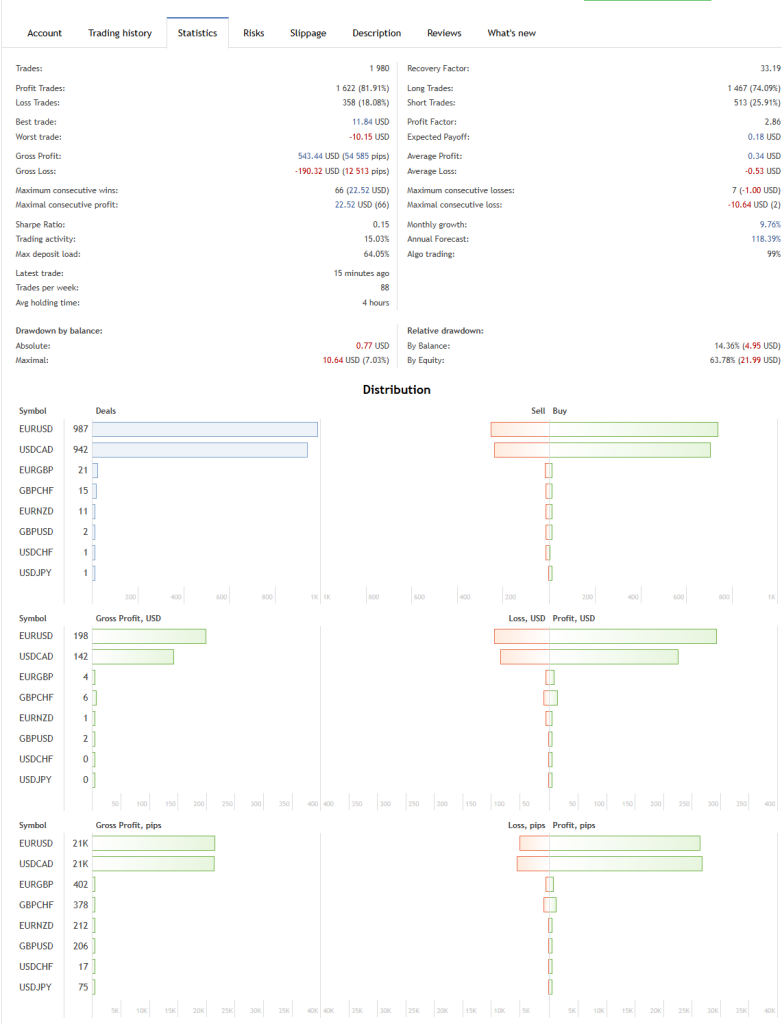
Tree of Life integrates an advanced suite of technical indicators with proprietary algorithmic logic to identify high-probability setups on EURUSD and USCAD. The system waits for optimal conditions before executing trades, maintaining strict discipline across all market phases. With 99% automated execution, every decision follows pre-defined mathematical rules rather than human discretion.
Featuring a Profit Factor of 2.86 and a Recovery Factor of 33.19, Tree of Life demonstrates a rare ability to sustain profitability through drawdowns. The system's built-in risk controls ensure each trade risks a controlled portion of capital, protecting the portfolio from excessive volatility. Diversification across major pairs reduces single-pair exposure.
Exact inputs used in the test above. Default EA settings will not reproduce these results — import these values before running it live.
| Parameter | Value |
|---|---|
| LotsType | 1 |
| Lots | 0.01 |
| ByBalance | 200 |
| TakeProfit | 50 |
| MaxSpread | 40 |
| Slippage | 10 |
| SLType | 0 |
| StopLoss | 0 |
| ATRSLPer | 14 |
| ATRSLMulti | 1 |
| TrailingStart | 0 |
| TrailingStep | 9 |
| UseMartingale | true |
| LotMultiplier | 1.1 |
| Distance | 200 |
| MaxTradeBuy | 4 |
| MaxTradeSell | 4 |
| HourStart | 1 |
| HourStop | 23 |
| myGMTTYpe | 1 |
| GMTplus | 3 |
| CutLossPercentage | 0 |
| CutLossMoney | 0 |
| MaxLoss | 0 |
| MaxProfit | 0 |
| UseNews | true |
| IncludeLow | true |
| NLowXBeofre | 5 |
| NLowXAfter | 10 |
| IncludeMedium | true |
| NMediumXBeofre | 25 |
| NMediumXAfter | 30 |
| IncludeHigh | true |
| NHighXBeofre | 60 |
| NHighXAfter | 60 |
| MagNumber | 29 |
| PanelX | 10 |
| PanelY | 18 |
| FontSize | 8 |
| UpdateHour | 1 |
| Bars in test | 60179 |
| Mismatched charts errors | 12 |
.ex4 for MT4 or .ex5 for MT5).set) for supported currency pairsquick_install.bat)quick_install.bat.MQL4/Experts (or MQL5/Experts) and preset files into MQL4/Presets.Yes. All core indicators and EAs on RBOT.CC are free to download directly without email walls, hidden paywalls, or account limits. If a third-party developer offers an optional commercial Pro version, it is clearly indicated with an external source link.
Yes. You can run them on unlimited demo and live accounts with any MetaTrader broker. We strongly recommend testing thoroughly on a demo account for at least 2 to 4 weeks to observe trade behavior and drawdowns before using real money.
You can join our Telegram community (@wwwrbotcc) to ask setup questions, share backtests, and discuss strategy settings with the RBOT team and other algorithmic traders.
⚠ READ BEFORE USE
This EA is for educational and expert use only. Test on a DEMO account for at least 30 days before going live. By clicking “OK”, you acknowledge and accept the risks of trading.