Third-party product
Four-engine gold system on XAUUSD H1: 2,899 trades over 680 days, profit factor 2.42 and 2% maximum drawdown.
TL;DR
2,899 trades and profit factor 2.42 at 2% drawdown, but four correlated engines on one symbol with the news filter off concentrate the risk beyond what the drawdown shows.
No official listing has been supplied for this product.
Independently tested
RBOT.CC provides the review conditions and public evidence report below. Results are not a promise of future performance.
This page describes a third-party product. RBOT.CC is not the developer unless explicitly stated. Verify all claims before use.
QuantTester safety grade A+ 95/100 · 90-100 pts
Classified as Hybrid (Tiered Basket + Trend Following): the Scraper Gold MT5 XAUUSD H1 backtest shows a layered same-minute basket architecture with a 2.42 profit factor, a 2.0% maximum drawdown, and residual PF of 1.73 after removing the top 5% of trades, confirming robust non-outlier-driven expectancy, though the realised payoff ratio of 1.02 and an unbounded loss tail (largest loss $10 vs. median $3) define a controlled but thin per-trade margin.
Performance figures depend on the test period, broker conditions, spread, commission, slippage, leverage, and risk settings. Confirm the test dates and source report before relying on any figure. Backtest results are not a promise of future performance.
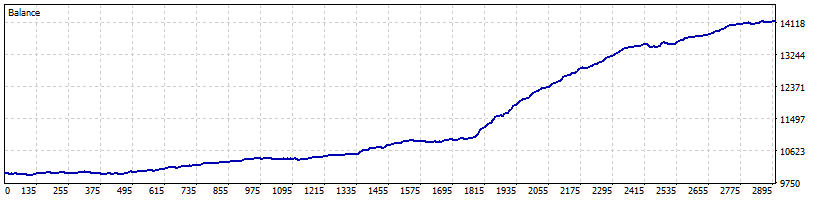
Scraper Gold MT5 runs four independent engines, Scrap A to D, on the same XAUUSD chart, each with its own lot mode, exit style and direction switch. The tested configuration puts all four on engine profile 3 with adaptive offset enabled, 0.25% risk per engine against a 1,000 balance reference, and custom exits at a 500-point stop and 1,500-point target with a 250-point trail. It closed 2,899 trades in 680 days, about four per day, with an average holding time just under two hours.
Profit factor 2.42 over 2,899 trades with 2% maximum drawdown is a workable shape, and position sizing stayed at 0.01 lots per engine so there is no martingale step-up. The weak parts are structural: the news filter is off in this run, Friday positions are force-closed 30 minutes before the close, and four engines sharing one symbol means the reported drawdown is the sum of four correlated exposures rather than a diversified one.
Exact inputs used in the test above. Default EA settings will not reproduce these results — import these values before running it live.
| Parameter | Value |
|---|---|
| InpStrategyMode | 0 |
| InpLotModeScrapA | 2 |
| InpFixedLotScrapA | 0.01 |
| InpRiskScrapA | 0.25 |
| InpBalanceRefScrapA | 1000.0 |
| InpLotModeScrapB | 2 |
| InpFixedLotScrapB | 0.01 |
| InpRiskScrapB | 0.25 |
| InpBalanceRefScrapB | 1000.0 |
| InpLotModeScrapC | 2 |
| InpFixedLotScrapC | 0.01 |
| InpRiskScrapC | 0.25 |
| InpBalanceRefScrapC | 1000.0 |
| InpLotModeScrapD | 2 |
| InpFixedLotScrapD | 0.01 |
| InpRiskScrapD | 0.25 |
| InpBalanceRefScrapD | 1000.0 |
| InpProfileScrapA | 3 |
| InpProfileScrapB | 3 |
| InpProfileScrapC | 3 |
| InpProfileScrapD | 3 |
| InpAdaptiveOffset | true |
| InpUseNewsFilter | false |
| InpNewsMinutesBefore | 30 |
| InpNewsMinutesAfter | 30 |
| InpNewsWeekRiskMode | 0 |
| InpMagicOffset | 0 |
| InpDashboardMode | 3 |
| InpUseDailyLossLimit | false |
| InpDailyLossPercent | 4.0 |
| InpDailyLossClosePositions | true |
| InpFridayCloseMinutes | 30 |
| InpDirectionScrapA | 0 |
| InpDirectionScrapB | 0 |
| InpDirectionScrapC | 0 |
| InpDirectionScrapD | 0 |
| InpExitModeScrapA | 0 |
| InpCustomSLScrapA | 500.0 |
| InpCustomTPScrapA | 1500.0 |
| InpCustomStartScrapA | 100.0 |
| InpCustomDistScrapA | 250.0 |
| InpCustomStepScrapA | 50.0 |
| InpExitModeScrapB | 0 |
| InpCustomSLScrapB | 500.0 |
| InpCustomTPScrapB | 1500.0 |
| InpCustomStartScrapB | 100.0 |
| InpCustomDistScrapB | 250.0 |
| InpCustomStepScrapB | 50.0 |
| InpExitModeScrapC | 0 |
| InpCustomSLScrapC | 500.0 |
| InpCustomTPScrapC | 1500.0 |
| InpCustomStartScrapC | 100.0 |
| InpCustomDistScrapC | 250.0 |
| InpCustomStepScrapC | 50.0 |
| InpExitModeScrapD | 0 |
| InpCustomSLScrapD | 500.0 |
| InpCustomTPScrapD | 1500.0 |
| InpCustomStartScrapD | 100.0 |
| InpCustomDistScrapD | 250.0 |
| InpCustomStepScrapD | 50.0 |
| InpSlippageScrapA | 2 |
| InpSlippageScrapB | 2 |
| InpSlippageScrapC | 2 |
| InpSlippageScrapD | 2 |
| InpNewsScope | 0 |
| InpNewsFOMC | true |
| InpNewsCPI | true |
| InpNewsNFP | true |
| InpNewsPCE | true |
| InpNewsPPI | false |
| InpNewsGDP | false |
| InpNewsRetail | false |
| InpNewsISM | false |
.ex4 for MT4 or .ex5 for MT5).set) for supported currency pairsquick_install.bat)quick_install.bat.MQL4/Experts (or MQL5/Experts) and preset files into MQL4/Presets.Yes. All core indicators and EAs on RBOT.CC are free to download directly without email walls, hidden paywalls, or account limits. If a third-party developer offers an optional commercial Pro version, it is clearly indicated with an external source link.
Yes. You can run them on unlimited demo and live accounts with any MetaTrader broker. We strongly recommend testing thoroughly on a demo account for at least 2 to 4 weeks to observe trade behavior and drawdowns before using real money.
You can join our Telegram community (@wwwrbotcc) to ask setup questions, share backtests, and discuss strategy settings with the RBOT team and other algorithmic traders.
⚠ READ BEFORE USE
This EA is for educational and expert use only. Test on a DEMO account for at least 30 days before going live. By clicking “OK”, you acknowledge and accept the risks of trading.