Third-party product
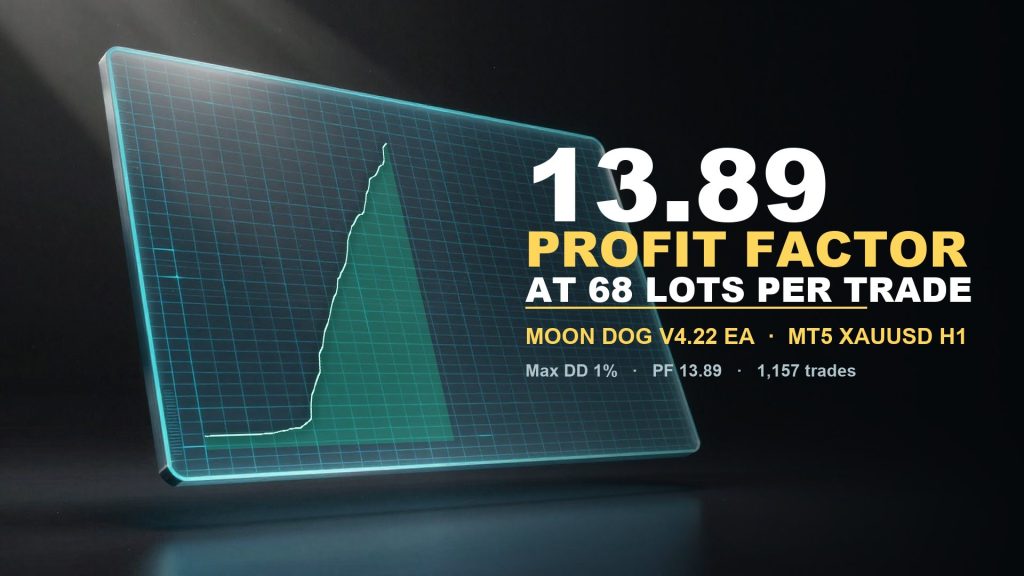
Nine-module modular gold EA on XAUUSD H1 with 1,157 trades, profit factor 13.89 and 1% relative balance drawdown in the vendor backtest.
TL;DR
1,157 trades with profit factor 13.89 and a 1% relative drawdown, but the pips-mode report and 68-lot average size make the account-level numbers unusable until they are confirmed on a currency-denominated test.
No official listing has been supplied for this product.
Independently tested
RBOT.CC provides the review conditions and public evidence report below. Results are not a promise of future performance.
This page describes a third-party product. RBOT.CC is not the developer unless explicitly stated. Verify all claims before use.
QuantTester safety grade A+ 98/100 · 90-100 pts
Classified as Hybrid (Tiered Basket + Trend Following): The Moon Dog V4.22 EA on XAUUSD H1 produced a 76.66% win rate and 4.23 payoff ratio over 679 days, with a maximum equity drawdown of only 1% and a residual PF of 9.41 after excluding the top 5% of trades, confirming a robust tiered-basket edge that is structurally sound but carries unverified execution assumptions typical of high-frequency basket strategies.
Performance figures depend on the test period, broker conditions, spread, commission, slippage, leverage, and risk settings. Confirm the test dates and source report before relying on any figure. Backtest results are not a promise of future performance.
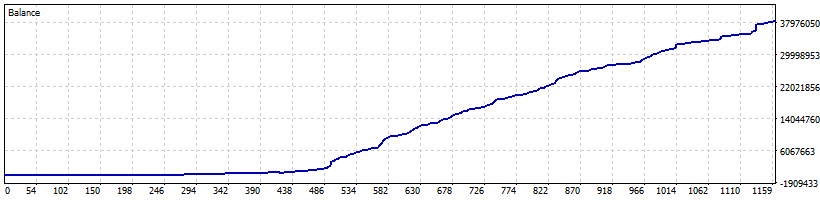
Moon Dog V4.22 runs nine independent entry modules on the same XAUUSD chart, Nova, Apex, Zenith, Pulse, Eclipse, Orbit, Halo, Titan and Comet, and lets each one manage its own exits. The tested configuration keeps all nine switched on, caps same-direction exposure at eight positions and applies a 20-pip reference stop with virtual trailing, while exits are left to the per-module tuned settings and the optional three-step partial take-profit is switched off. Over 679 days it produced 1,157 closed trades, about 1.7 per day, with an average holding time of 132 minutes.
The report was generated in MT5 profit-in-pips currency mode, so its percentage figures are not comparable with a funded account, and the average position size of 68.48 lots against a 10,000 starting balance means the tester was running near its margin limit. Relative drawdown stayed at 1% and profit factor at 13.89 across 1,157 trades, with a 76.66% win rate built on a 20-pip hard stop against three partial exits. Weekend shield and the NFP, CPI and FOMC filters are all enabled in this run, and the prop-firm module is available but switched off.
Exact inputs used in the test above. Default EA settings will not reproduce these results — import these values before running it live.
| Parameter | Value |
|---|---|
| MoonQuickSetup | 0 |
| AiTradingMode | 1 |
| MoonSizing | 5 |
| MoonFixedLot | 0.01 |
| MoonCustomRiskPercent | 2.0 |
| MaximumRiskLot | 0.0 |
| AdaptivePositionSize | 0 |
| ModuleSizingMode | 0 |
| MoonNovaSizingOverride | 0.0 |
| MoonApexSizingOverride | 0.0 |
| MoonZenithSizingOverride | 0.0 |
| MoonPulseSizingOverride | 0.0 |
| MoonEclipseSizingOverride | 0.0 |
| MoonOrbitSizingOverride | 0.0 |
| MoonHaloSizingOverride | 0.0 |
| MoonTitanSizingOverride | 0.0 |
| MoonCometSizingOverride | 0.0 |
| MoonStopLossPips | 20.0 |
| MoonProtectionMode | 2 |
| PersistVirtualTrailing | true |
| MoonLockEnabled | true |
| MoonLockStartPer001 | 1.0 |
| MoonLockProfile | 1 |
| MoonLockPercent | 50.0 |
| UseCustomBreakEvenTrailing | false |
| CustomBreakEvenStartPips | 10.0 |
| CustomBreakEvenLockPips | 1.0 |
| CustomTrailingStartPips | 20.0 |
| CustomTrailingDistancePips | 10.0 |
| CustomTrailingStepPips | 2.0 |
| MoonApexTargetPips | 140.0 |
| MoonCoreTargetPips | 150.0 |
| MoonPartialTakeProfit | false |
| MoonPartialKeepMoonLock | true |
| MoonPartialTarget1Pips | 35.0 |
| MoonPartialPercent1 | 25.0 |
| MoonPartialTarget2Pips | 50.0 |
| MoonPartialPercent2 | 25.0 |
| MoonPartialTarget3Pips | 65.0 |
| MoonPartialPercent3 | 25.0 |
| MoonNova | true |
| MoonApex | true |
| MoonZenith | true |
| MoonPulse | true |
| MoonEclipse | true |
| MoonOrbitEntries | true |
| MoonHaloEntries | true |
| MoonTitanEntries | true |
| MoonCometEntries | true |
| UsePerModuleTunedExits | true |
| MoonAddOnA | false |
| MoonAddOnB | false |
| MoonAddOnC | false |
| MoonAddOnD | false |
| MaxSameDirectionPositions | 8 |
| AllowNettingAccount | false |
| MoonTradeIdentity | 33300 |
| PreviousMoonTradeIdentityBase | 0 |
| PreviousMoonDogTradeIdentity | 0 |
| UseTradingHours | false |
| TradingStartHour | 2 |
| TradingStartMinute | 0 |
| TradingEndHour | 19 |
| TradingEndMinute | 0 |
| DeletePendingOutsideHours | false |
| WeekendShieldEnabled | true |
| WeekendScheduleMode | 0 |
| WeekendFridayCutoffMinutes | 240 |
| WeekendReopenDelayMinutes | 240 |
| WeekendFallbackFridayHour | 20 |
| WeekendFallbackMondayHour | 5 |
| WeekendCustomFridayHour | 20 |
| WeekendCustomFridayMinute | 0 |
| WeekendCustomMondayHour | 5 |
| WeekendCustomMondayMinute | 0 |
| UseMajorEventControl | true |
| TradeDuringNFP | false |
| NFPMinutesBefore | 30 |
| NFPMinutesAfter | 60 |
| TradeDuringCPI | false |
| CPIMinutesBefore | 30 |
| CPIMinutesAfter | 60 |
| TradeDuringFOMC | false |
| FOMCMinutesBefore | 60 |
| FOMCMinutesAfter | 150 |
| MoonCalendarShieldEnabled | false |
| FilterHighImpactNews | true |
| FilterModerateImpactNews | false |
| NewsMinutesBefore | 60 |
| NewsMinutesAfter | 30 |
| DeletePendingBeforeNews | true |
| NewsFailClosed | false |
| UseBuiltInMajorNewsBackup | true |
| WideSpreadProtectionEnabled | false |
| WideSpreadMaxPoints | 200.0 |
| NormalDailyLimitEnabled | false |
| NormalMaxDailyLossPercent | 20.0 |
| NormalDailyClosePositions | true |
| NormalDailyDeletePendings | true |
| PropFirmActive | false |
| PropFirmStartingBalance | 0.0 |
| PropFirmProfitTargetPercent | 8.0 |
| PropFirmMaxDailyLossPercent | 5.0 |
| PropFirmMaxTotalDrawdownPercent | 10.0 |
| PropFirmSafetyBufferPercent | 0.5 |
| PropFirmStopAtProfitTarget | true |
| PropFirmDeletePendingsWhenBlocked | true |
| PropFirmClosePositionsOnLimit | true |
| PropFirmClosePositionsAtTarget | false |
| PropFirmDrawdownMode | 0 |
| PropFirmDailyBaseline | 1 |
| PropFirmDailyLossAmount | 0 |
| PropFirmTrailingAmount | 0 |
| PropFirmDailyResetHour | 0 |
| PropFirmDailyResetMinute | 0 |
| PropFirmMaximumExposureSlots | 0 |
| LotScalingEnabled | false |
| LotScalingBaseBalance | 0.0 |
| LotScalingBalanceStep | 500.0 |
| LotScalingLotStep | 0.01 |
.ex4 for MT4 or .ex5 for MT5).set) for supported currency pairsquick_install.bat)quick_install.bat.MQL4/Experts (or MQL5/Experts) and preset files into MQL4/Presets.Yes. All core indicators and EAs on RBOT.CC are free to download directly without email walls, hidden paywalls, or account limits. If a third-party developer offers an optional commercial Pro version, it is clearly indicated with an external source link.
Yes. You can run them on unlimited demo and live accounts with any MetaTrader broker. We strongly recommend testing thoroughly on a demo account for at least 2 to 4 weeks to observe trade behavior and drawdowns before using real money.
You can join our Telegram community (@wwwrbotcc) to ask setup questions, share backtests, and discuss strategy settings with the RBOT team and other algorithmic traders.
⚠ READ BEFORE USE
This EA is for educational and expert use only. Test on a DEMO account for at least 30 days before going live. By clicking “OK”, you acknowledge and accept the risks of trading.