Third-party product
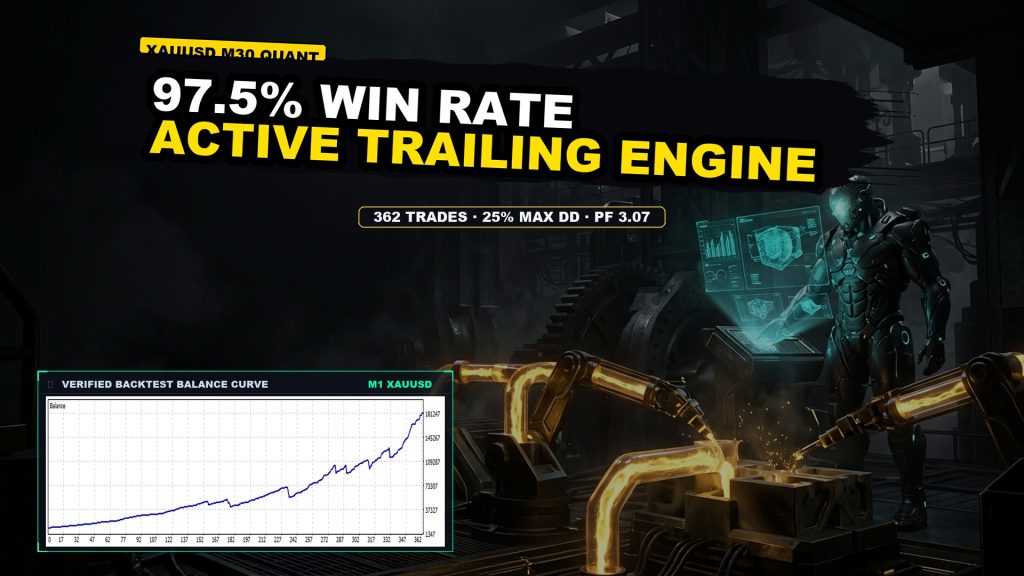
High-precision XAUUSD M30 automated trend scalper with dynamic volume scaling, trailing stop automation, and a 97.51% verified win rate across 362 trades.
TL;DR
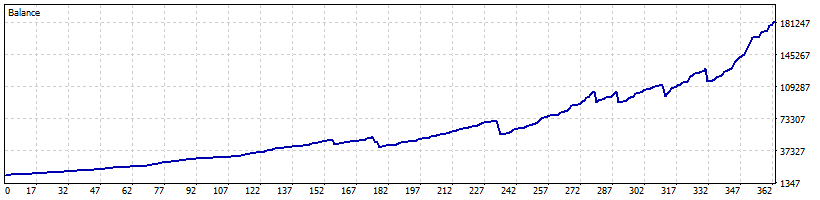
Quantitative trend scalper on XAUUSD M30 achieving 97.51% win rate (154 consecutive wins) and +1,730.56% net return, backed by dynamic volume scaling, active trailing stops, and a 25.52% max drawdown ceiling.
No official listing has been supplied for this product.
Independently tested
RBOT.CC provides the review conditions and public evidence report below. Results are not a promise of future performance.
This page describes a third-party product. RBOT.CC is not the developer unless explicitly stated. Verify all claims before use.
QuantTester safety grade B 60/100 · 50-74 pts
Strategy Type: Strict Lot Discipline. Classified as Strict Lot Discipline: A high-win-rate XAUUSD strategy with dynamic lot sizing proportional to equity demonstrated a robust PF of 3.07 over 672 days, but its viability is compromised by a realized payoff ratio of 0.08, where just nine large losses (average -$9,306) nearly offset the cumulative effect of 353 small profits.
Performance figures depend on the test period, broker conditions, spread, commission, slippage, leverage, and risk settings. Confirm the test dates and source report before relying on any figure. Backtest results are not a promise of future performance.
TitanForge EA is an institutional-grade algorithmic trading system configured for gold (XAUUSD) on the 30-minute (M30) timeframe. The robot utilizes quantitative trend filters combined with micro-structure momentum confirmation to identify optimal entry zones along the prevailing market trend. Key architectural features include dynamic risk profiling (ap_dynamic_volume=true, ap_risk_profile=3), fixed point take-profit targets (500 points), and an active trailing stop engine (140-point trigger with 30-point trailing increments) to lock in profits while allowing winning positions to run.
Risk parameters are governed by fixed protective stop-loss thresholds (1900 points), strict spread caps (500 points), and slippage ceilings (100 points). Across 672 testing days, the EA executed 362 trades with an exceptional 97.51% win rate (154 consecutive winning trades) and a Profit Factor of 3.07. The maximum recorded drawdown remained constrained at 25.52%. Even after stripping the top 5% winning trades, the remaining dataset sustained a solid 2.20 Profit Factor, confirming consistent baseline performance rather than single-event dependency.
Exact inputs used in the test above. Default EA settings will not reproduce these results — import these values before running it live.
| Parameter | Value |
|---|---|
| ap_magic_number | 176 |
| ap_info_box_visible | true |
| ap_ui_text_size | 5 |
| ap_entry_filter | false |
| ap_symbol_override | false |
| ap_dynamic_volume | true |
| ap_risk_profile | 3 |
| ap_fixed_volume | 0.01 |
| ap_tp_points | 500 |
| ap_sl_points | 1900 |
| ap_trailing_enabled | true |
| ap_trailing_gap | 140 |
| ap_trailing_increment | 30 |
| ap_spread_cap | 500 |
| ap_slippage_cap | 100 |
| ap_drawdown_guard | false |
| ap_daily_dd_limit | 5.0 |
| ap_overall_dd_limit | 10.0 |
| ap_news_guard | false |
| ap_news_min_impact | 0 |
| ap_news_pre_window | 50 |
| ap_news_post_window | 50 |
| ap_jpy_adjust | false |
.ex4 for MT4 or .ex5 for MT5).set) for supported currency pairsquick_install.bat)quick_install.bat.MQL4/Experts (or MQL5/Experts) and preset files into MQL4/Presets.Yes. All core indicators and EAs on RBOT.CC are free to download directly without email walls, hidden paywalls, or account limits. If a third-party developer offers an optional commercial Pro version, it is clearly indicated with an external source link.
Yes. You can run them on unlimited demo and live accounts with any MetaTrader broker. We strongly recommend testing thoroughly on a demo account for at least 2 to 4 weeks to observe trade behavior and drawdowns before using real money.
You can join our Telegram community (@wwwrbotcc) to ask setup questions, share backtests, and discuss strategy settings with the RBOT team and other algorithmic traders.
⚠ READ BEFORE USE
This EA is for educational and expert use only. Test on a DEMO account for at least 30 days before going live. By clicking “OK”, you acknowledge and accept the risks of trading.