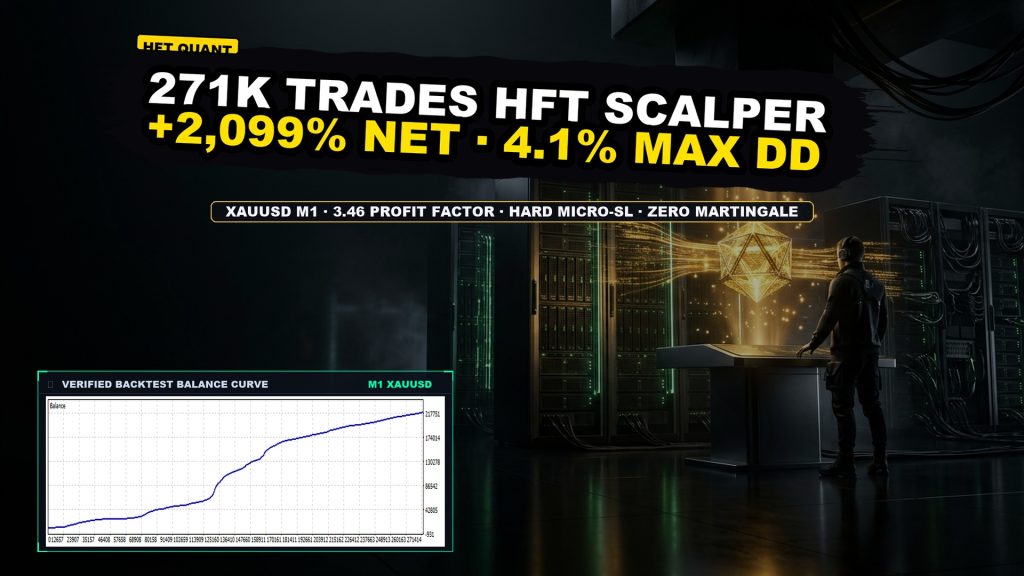
YinChaoJi EN MT5

YinChaoJi EN MT5

Third-party product

Ultra-high frequency gold scalper executing 271,826 trades on XAUUSD M1 with a 3.46 profit factor and 4.17% maximal drawdown.

TL;DR

HFT M1 gold scalper with 271,826 trades. Produced +2,099.43% net return with 4.17% max drawdown and 3.46 PF. Requires raw spreads and low-latency execution.

Source & Review

Source

Publisher: YinChaoJi Dev

No official listing has been supplied for this product.

RBOT review status

Independently tested

RBOT.CC provides the review conditions and public evidence report below. Results are not a promise of future performance.

Testing conditions

Strategy Origin
YinChaoJi Dev
Symbol(s)
XAUUSD
Timeframe
M1
Broker / data source
ForexClub-MT5 Demo Server
Spread and commission
Real tick spreads & execution
Leverage
1:100
Risk settings
0.01 lot mode with 10-pt stop loss
Test period
2025.01.03 - 2026.11.07

This page describes a third-party product. RBOT.CC is not the developer unless explicitly stated. Verify all claims before use.

AI Risk Review

QuantTester safety grade A 88/100 · 75-89 pts

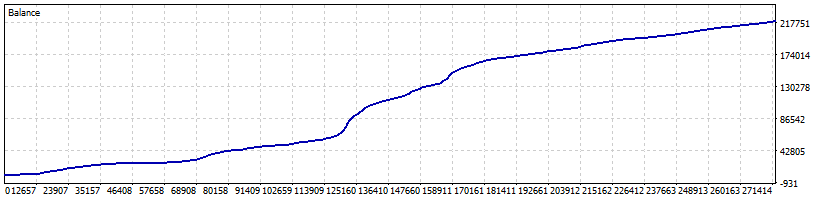
Strategy Type: Ultra-High Frequency Scalper (HFT). YinChaoJi EN executes an astounding 271,826 trades on XAUUSD M1 with an average holding time of 1 minute 22 seconds, generating +2,099.43% net return with exceptionally tight drawdowns (4.17% maximal equity drawdown). With a profit factor of 3.46 and recovery factor of 503.29, it demonstrates strong edge under zero/low slippage backtest conditions. Real-world execution will depend heavily on low-latency broker execution and raw spreads.

  • Return +2,099.43%
  • Max drawdown 4.17%
  • Profit factor 3.46
  • Trades 271,826

Detected Risk Signals & Behavioral Flags

  • Strict Lot Discipline
  • Payoff Ratio 3.28
  • Robust Organic Profit
  • Sufficient Sample Horizon
  • Minimal Drawdown
  • HFT Execution Sensitivity

View the full AI report on QuantTester →

How to read these results

Performance figures depend on the test period, broker conditions, spread, commission, slippage, leverage, and risk settings. Confirm the test dates and source report before relying on any figure. Backtest results are not a promise of future performance.
Performance evidence

Backtest evidence for YinChaoJi EN MT5

Strategy Details

Logic

YinChaoJi EN (Money Printing Machine) deploys an ultra-high-frequency scalping logic that exploits micro-price fluctuations on XAUUSD M1, executing over 270,000 sub-2-minute trades.

Risk Management

Strict individual trade stop-loss (StopLoss=10.0, StopLosb=5.0) with no martingale or grid exposure. Tight risk parameters keep historical drawdown under 4.17%.

Trading Setup

Symbol/Timeframe
XAUUSD M1
Min. Deposit
500
Platform
MetaTrader 5

Parameters & Installation

Backtest Run Parameters 15 inputs

Exact inputs used in the test above. Default EA settings will not reproduce these results — import these values before running it live.

Load it in MT4/MT5 Strategy Tester → Inputs → Load.
Parameter Value
TakeProfit 0.0
StopLoss 10.0
StopLosb 5.0
opstnum 1
indvpips 10.0
TDD 5
Timem 3
LOTSKG false
Lots 0.01
Risk 500.0
MaxSPREAD 5.0
slippage 20
MagicN1 88888888
Commentt1 123321
UseTimeFilter true

Frequently Asked Questions

How do I download the EA?
Click the "GET DOWNLOAD ON TELEGRAM" button (or click "INSTANT DOWNLOAD" in the top hero to jump to it). The button connects to our official Telegram delivery bot, which instantly sends you the clean, uncorrupted download package directly — 100% free with no registration, no subscription, and no paywalls required.

📦 Package Contents:
• Expert Advisor file (.ex4 for MT4 or .ex5 for MT5)
• Optimized preset files (.set) for supported currency pairs
• Historical backtest reports and performance metrics
• One-click auto-installer script (quick_install.bat)

Once downloaded via Telegram, extract the ZIP archive and follow the installation instructions below.
How do I install the EA on my MT4 / MT5 account?
To ensure smooth setup, we provide two installation methods:

⚡ Method 1: One-Click Auto-Installation (Recommended)
1. Extract the downloaded zip package.
2. Double-click quick_install.bat.
3. Confirm your MT4/MT5 path (the script auto-detects it; press Enter). The script automatically deploys the EA (.ex4/.ex5) and presets (.set) into the correct folders, and launches your terminal.

🛠️ Method 2: Manual Installation
1. In MetaTrader, go to File > Open Data Folder.
2. Copy the EA into MQL4/Experts (or MQL5/Experts) and preset files into MQL4/Presets.
3. Right-click Expert Advisors in the Navigator panel and select Refresh.

⚙️ Critical Configuration:
Enable "Allow Algo Trading" in the EA's Common tab and make sure the master Algo Trading button at the top toolbar is Green.

For video demonstrations and troubleshooting, visit our step-by-step Installation Guide.
Which broker is recommended for running this EA?
We use IC Markets Raw Spread for backtests and live runs: low spreads keep the tester's cost assumptions close to real execution. The EA runs on any MetaTrader broker — just match the symbol suffix, spread and commission settings, and give it two weeks on demo first.

Demo or live registration: IC Markets portal.
Are these tools completely free to download?

Yes. All core indicators and EAs on RBOT.CC are free to download directly without email walls, hidden paywalls, or account limits. If a third-party developer offers an optional commercial Pro version, it is clearly indicated with an external source link.

Can I use these tools on demo and live accounts?

Yes. You can run them on unlimited demo and live accounts with any MetaTrader broker. We strongly recommend testing thoroughly on a demo account for at least 2 to 4 weeks to observe trade behavior and drawdowns before using real money.

Do I need a VPS to use these tools?
Indicators and manual chart work do not need a VPS — a normal PC is enough.

For EAs that must stay online 24/5 we run ours on a small HHOST Windows VPS (2 vCPU / 4 GB comfortably runs a few terminals). It only protects you from home connection drops and power cuts.

Launch a server here: HHOST portal.
Where can I get help or discuss settings?

You can join our Telegram community (@wwwrbotcc) to ask setup questions, share backtests, and discuss strategy settings with the RBOT team and other algorithmic traders.

READY TO AUTOMATE YOUR TRADING? GET DOWNLOAD NOW

⚠ READ BEFORE USE

This EA is for educational and expert use only. Test on a DEMO account for at least 30 days before going live. By clicking “OK”, you acknowledge and accept the risks of trading.