
Third-party product
$10K to $610K in 16 months — 97.57% win rate with 27.62 profit factor
TL;DR
MT5 EA whose vendor backtest claims $10,000 to $610,000 in 16 months at a 97.57% win rate - reviewed here alongside what the drawdown data suggests.
No official listing has been supplied for this product.
Independently tested
RBOT.CC provides the review conditions and public evidence report below. Results are not a promise of future performance.
This page describes a third-party product. RBOT.CC is not the developer unless explicitly stated. Verify all claims before use.
QuantTester safety grade B 60/100 · 50-74 pts
Classified as Hybrid (Tiered Basket + Trend Following): The strategy exhibits a high win rate (96.9%) and strong profit factor (3.16) over a 664-day backtest, but its asymmetric payoff (average loss $4,119 vs average win $410) and unbounded tail risk (max single loss $14,622 = 3.4x median loss) leave it vulnerable to a single catastrophic event; the 26.6% max drawdown and reliance on outlier-dependent clustering (top 5% trades contribute 14% of gross profit, yet remaining PF of 2.71 remains robust) suggest a viable but fragile edge in live markets if stop-loss discipline is not rigorously enforced.
Performance figures depend on the test period, broker conditions, spread, commission, slippage, leverage, and risk settings. Confirm the test dates and source report before relying on any figure. Backtest results are not a promise of future performance.
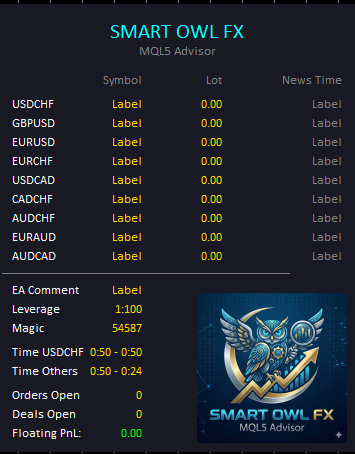
Smart Owl FX operates on a concentrated one-hour trading window from 21:50 to 22:50 GMT+2, entering and exiting positions with precision timing. The EA runs on seven major forex pairs simultaneously—EURUSD, GBPUSD, USDCAD, EURCHF, AUDUSD, EURAUD, and AUDCAD—diversifying risk while targeting small consistent gains. Each trade uses a narrow take-profit target between 4 and 10 pips with a wider stop-loss between 40 and 85 pips, aiming for a high win rate over large reward-per-trade. The system includes a calendar-based news filter that scans for ADP Non-Farm Payrolls, Interest Rate decisions, Unemployment Rate releases, and CPI data, blocking new trades 300 minutes before and after each event. During the December holiday season and early January, trading is automatically suspended to avoid thin-market conditions.
Risk is set to 5% per trade across all symbols with a dedicated low-risk preset included. Each currency pair has its own stop-loss level calibrated to its volatility, ranging from 40 pips on AUDCAD up to 85 pips on GBPUSD. The built-in economic news filter is a critical risk layer, automatically preventing new positions from opening 5 hours before and after major data releases. A holiday trading suspension protects against low-liquidity conditions during the December-January period. The EA supports granular per-symbol risk adjustment, allowing traders to fine-tune exposure for individual pairs independently.
Exact inputs used in the test above. Default EA settings will not reproduce these results — import these values before running it live.
| Parameter | Value |
|---|---|
| ShowInfoPanel | true |
| FullAutoTrade2 | true |
| m_magic | 54587 |
| Max_Spread | 10.0 |
| buy_trade | true |
| sell_trade | true |
| split_orders | 1 |
| min_tp_check | false |
| min_tp_start | 40.0 |
| lotmode_basic | 1 |
| MetodAutoLot | 0 |
| UseBalance | 100.0 |
| lotmode | 1 |
| Risk1 | 5.0 |
| lotstep_mode_one | true |
| lotstep_auto | 0.01 |
| lotstep_auto_bal | 20.0 |
| InpLots1 | 0.1 |
| dst_mode | 0 |
| InpGMT_Winter | 2 |
| InpGMT_Summer | 2 |
| EA_Start_Hour1 | 21 |
| InpStartMinute1 | 50 |
| EA_End_Hour1 | 22 |
| InpEndMinute1 | 50 |
| EA_Start_Hour_additional_mode | 21 |
| InpStartMinute_additional_mode | 50 |
| EA_End_Hour_additional_mode | 22 |
| InpEndMinute_additional_mode | 24 |
| december_day_stop_trading_main | 23 |
| january_day_stop_trading_main | 5 |
| december_day_stop_trading | 20 |
| january_day_stop_trading | 10 |
| Trade_main | true |
| Take_Profit1 | 5.0 |
| Risk_main_usdchf | 5.0 |
| Lot_main_usdchf | 0.01 |
| max_tp | 5.0 |
| Stop_Loss1 | 75.0 |
| EURUSD_trade | true |
| Risk_eurusd | 5.0 |
| Lot_eurusd | 0.01 |
| EURUSD_SL | 60.0 |
| EURUSD_TP | 4.0 |
| USDCAD_trade | true |
| Risk_usdcad | 5.0 |
| Lot_usdcad | 0.01 |
| USDCAD_SL | 60.0 |
| USDCAD_TP | 10.0 |
| EURCHF_trade | true |
| Risk_eurchf | 5.0 |
| Lot_eurchf | 0.01 |
| EURCHF_SL | 70.0 |
| EURCHF_TP | 4.0 |
| GBPUSD_trade | true |
| Risk_gbpusd | 5.0 |
| Lot_gbpusd | 0.01 |
| GBPUSD_SL | 85.0 |
| GBPUSD_TP | 5.0 |
| ADDITIONAL_SYMBOL_NAME_1_trade | true |
| Risk_ADDITIONAL_SYMBOL_1 | 5.0 |
| Lot_cadchf | 0.01 |
| ADDITIONAL_SYMBOL_NAME_1_SL | 50.0 |
| ADDITIONAL_SYMBOL_NAME_1_TP | 4.0 |
| ADDITIONAL_SYMBOL_NAME_2_trade | true |
| Risk_ADDITIONAL_SYMBOL_2 | 5.0 |
| Lot_audchf | 0.01 |
| ADDITIONAL_SYMBOL_NAME_2_SL | 65.0 |
| ADDITIONAL_SYMBOL_NAME_2_TP | 4.0 |
| ADDITIONAL_SYMBOL_NAME_4_trade | true |
| Risk_ADDITIONAL_SYMBOL_4 | 5.0 |
| Lot_audusd | 0.01 |
| ADDITIONAL_SYMBOL_NAME_4_SL | 50.0 |
| ADDITIONAL_SYMBOL_NAME_4_TP | 4.0 |
| ADDITIONAL_SYMBOL_NAME_6_trade | true |
| Risk_ADDITIONAL_SYMBOL_6 | 5.0 |
| Lot_euraud | 0.01 |
| ADDITIONAL_SYMBOL_NAME_6_SL | 60.0 |
| ADDITIONAL_SYMBOL_NAME_6_TP | 4.0 |
| ADDITIONAL_SYMBOL_NAME_7_trade | true |
| Risk_ADDITIONAL_SYMBOL_7 | 5.0 |
| Lot_audcad | 0.01 |
| ADDITIONAL_SYMBOL_NAME_7_SL | 40.0 |
| ADDITIONAL_SYMBOL_NAME_7_TP | 4.0 |
| NewsFilter1 | true |
| minutes_news_after | 300 |
| minutes_news_before | 300 |
| HIGH | false |
.ex4 for MT4 or .ex5 for MT5).set) for supported currency pairsquick_install.bat)quick_install.bat.MQL4/Experts (or MQL5/Experts) and preset files into MQL4/Presets.Yes. All core indicators and EAs on RBOT.CC are free to download directly without email walls, hidden paywalls, or account limits. If a third-party developer offers an optional commercial Pro version, it is clearly indicated with an external source link.
Yes. You can run them on unlimited demo and live accounts with any MetaTrader broker. We strongly recommend testing thoroughly on a demo account for at least 2 to 4 weeks to observe trade behavior and drawdowns before using real money.
You can join our Telegram community (@wwwrbotcc) to ask setup questions, share backtests, and discuss strategy settings with the RBOT team and other algorithmic traders.
⚠ READ BEFORE USE
This EA is for educational and expert use only. Test on a DEMO account for at least 30 days before going live. By clicking “OK”, you acknowledge and accept the risks of trading.