
Third-party product
High-frequency XAUUSD H1 grid scalper featuring 50-pip dynamic spacing, 1.25x progressive lot scaling, and a strict 25% global equity stop-loss fail-safe.
TL;DR
Tested on MT5 XAUUSD H1 over 125,116 trades from 2025.01 to 2026.10 with 99% history quality. Shows $886,734.11 net profit and 2.06 profit factor, but exhibits a 41.62% maximum equity drawdown and 51.11% profit concentration in the top 5% of trades due to a 1.25x martingale volume expansion.
Independently tested
RBOT.CC provides the review conditions and public evidence report below. Results are not a promise of future performance.
This page describes a third-party product. RBOT.CC is not the developer unless explicitly stated. Verify all claims before use.
Strategy Safety Grade E
Catastrophic failure: Forced liquidation (Stop Out), capital wipeout, or catastrophic unhedged downside failure (hard floor).
Strategy Type: Martingale. Classified as Martingale: The Sky City EA uses a 1.25x lot multiplier with 50-pip step on XAUUSD, generating 51.11% of gross profit from the top 5% of trades while a 41.62% maximum equity drawdown and a residual PF of 1.01 after removing those outliers reveal that live-market fitness is marginal and structurally fragile.
Performance figures depend on the test period, broker conditions, spread, commission, slippage, leverage, and risk settings. Confirm the test dates and source report before relying on any figure. Backtest results are not a promise of future performance.
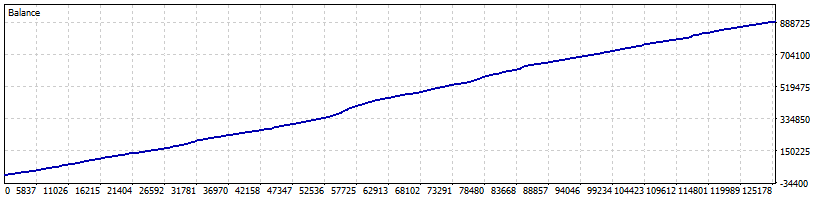
Sky City EA operates as a high-frequency grid trading robot on MetaTrader 5, designed primarily for XAUUSD on the 1-hour timeframe. It enters directional market orders based on short-term price momentum and opens subsequent grid layers at fixed intervals (Hand_FirstDist=50, Hand_MinDist=80) when price moves against open positions. Each subsequent grid order scales position volume by a 1.25 multiplier (Hand_AddLotMult) to shift the average break-even point closer to current price action. In independent testing across 125,116 executed trades, the strategy recorded a 63.71% win rate and a 2.06 overall profit factor. However, the top 5% of trades (6,256 trades) account for 51.11% of gross profit. Removing these outlier sequences leaves a remaining profit factor of 1.01 and net profit of only $7,118.77, indicating that long-term returns depend heavily on favourable trend completions rather than a uniform market edge across all volatility regimes.
The Expert Advisor incorporates a basket take-profit target (Hand_SideTP=40.0) alongside a net close profit threshold (NetClosePL=15.0) to exit open grid clusters once total floating profit reaches positive territory. It includes global stop parameters (Hand_AllStopLoss=25.0) and emergency pause levels to prevent continuous order stacking during run-away price trends. Measured backtest performance revealed a maximum relative equity drawdown of 41.62% ($33,943.13) against the initial $10,000 balance. The largest recorded single-trade loss reached -$1,412.40, which is approximately 76 times larger than the average loss of -$18.41. The aggressive 1.25x lot multiplication structure means account exposure expands rapidly during sustained one-directional market expansions, creating significant tail-risk if market volatility exceeds the predefined basket depth.
XAUUSD H1
To ensure smooth setup, we provide two installation methods:
⚡ Method 1: One-Click Auto-Installation (Recommended)
1. Extract the downloaded zip package.
2. Double-click quick_install.bat.
3. Confirm your MT4/MT5 path (the script auto-detects it; press Enter). The script automatically deploys the EA (.ex4/.ex5) and presets (.set) into the correct folders, and launches your terminal.
🛠️ Method 2: Manual Installation
1. In MetaTrader, go to File > Open Data Folder.
2. Copy the EA into MQL4/Experts (or MQL5/Experts) and preset files into MQL4/Presets.
3. Right-click Expert Advisors in the Navigator panel and select Refresh.
⚙️ Critical Configuration:
Enable "Allow Algo Trading" in the EA's Common tab and make sure the master Algo Trading button at the top toolbar is Green.
For video demonstrations and troubleshooting, visit our step-by-step Installation Guide.
For algorithmic and automated EA trading, we strongly recommend IC Markets (Raw Spread Account). It is widely recognized as the industry benchmark for Expert Advisors for several critical reasons:
• Raw Spreads from 0.0 Pips: Interbank liquidity from 25+ Tier-1 providers with average EUR/USD spreads of 0.1 pips, drastically reducing transaction costs and execution friction for EAs.
• Ultra-Low Latency & Fast Execution: Trading servers are hosted in the Equinix NY4 (New York) and LD4 (London) financial data centers with dedicated optical cross-connects, delivering sub-millisecond execution speeds vital for scalping EAs.
• No Dealing Desk & No Trading Restrictions: True ECN/STP execution with no requotes, no minimum stop-loss distance, and full support for automated hedging, grid, and scalping robots.
• Flexible Leverage & Global Regulation: Up to 1:500 / 1:1000 leverage options with segregated client funds in AA-rated banks.
You can register a test demo or live account via the IC Markets Official Registration Link. We always suggest running the EA on an IC Markets demo account for at least 2 weeks first to evaluate live latency and spread conditions.
Yes. All core indicators and EAs on RBOT.CC are free to download directly without email walls, hidden paywalls, or account limits. If a third-party developer offers an optional commercial Pro version, it is clearly indicated with an external source link.
Yes. You can run them on unlimited demo and live accounts with any MetaTrader broker. We strongly recommend testing thoroughly on a demo account for at least 2 to 4 weeks to observe trade behavior and drawdowns before using real money.
For technical indicators and manual chart analysis, a standard home PC or laptop is completely sufficient.
For automated trading EAs running 24/5 uninterrupted, deploying on a high-speed Windows VPS is strongly recommended to eliminate trade disruptions from home internet drops or power outages.
We recommend HHOST Cloud Servers (Tier 3+ Data Centers in Hong Kong, Japan, and Singapore):
• Operating System: Choose Windows (available on the Standard $10/mo plan and above).
• Hardware Specs: 2 vCPU cores, 4 GB RAM, 40 GB SSD, and 100 Mbps bandwidth provide optimal performance for running multiple MetaTrader terminals simultaneously.
• Low Latency & High Uptime: High-capacity network route with 99.95% availability and sub-20ms latency to regional brokers.
You can configure and launch your server via the HHOST Windows Server Portal.
You can join our Telegram community (@wwwrbotcc) to ask setup questions, share backtests, and discuss strategy settings with the RBOT team and other algorithmic traders.
⚠ READ BEFORE USE
This EA is for educational and expert use only. Test on a DEMO account for at least 30 days before going live. By clicking “OK”, you acknowledge and accept the risks of trading.