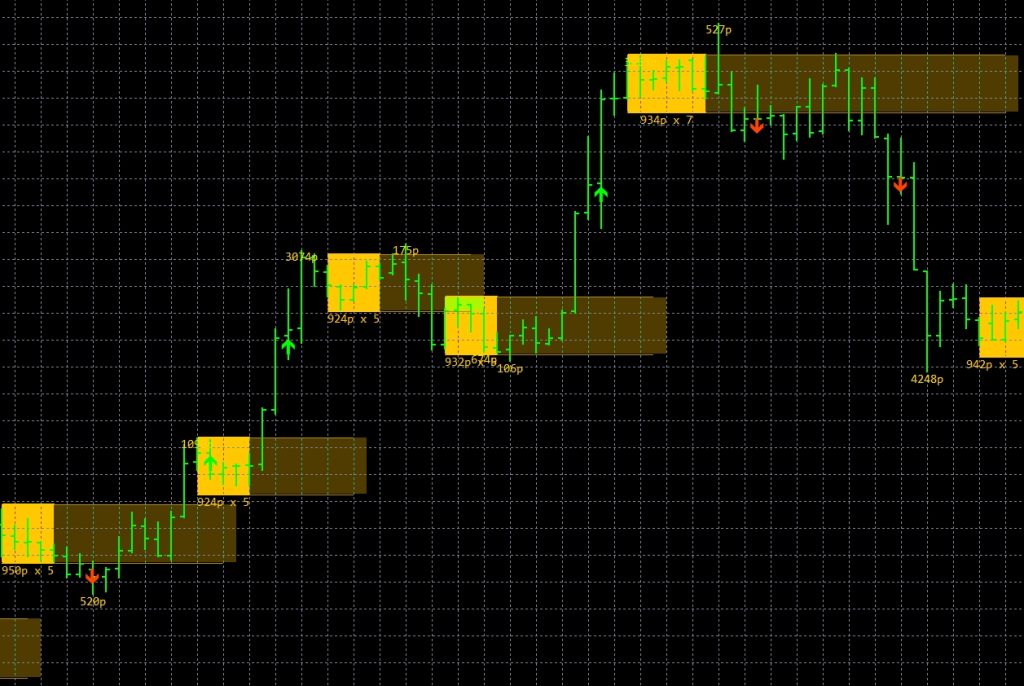
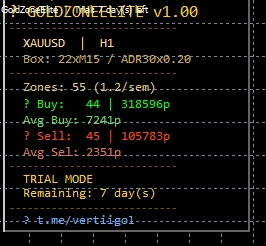
MT4 indicator that maps ATR-based consolidation zones on gold and major pairs and fires arrow signals on breakout. Performance not independently verified.
Source & Review
Source
No official listing has been supplied for this product.
RBOT review status
Source information only
Product details are sourced from the publisher. RBOT.CC has not independently verified performance claims.
Testing conditions
Strategy Origin
RBOT.CC
This page describes a third-party product. RBOT.CC is not the developer unless explicitly stated. Verify all claims before use.
Performance evidence
Strategy Details
Logic
Gold Zone Elite calculates a 22-bar ATR volatility box to map market consolidation. When a candlestick closes outside the range boundary, an arrow signal triggers, projecting mathematical Fibonacci expansion lines (0.618 to 2.618) as structured profit-taking targets.
Risk Management
Position stop losses beyond the opposite box boundary to protect against false breakouts. Utilize the projected Fibonacci extension targets for structured partial profit taking, trailing stops to breakeven once price reaches the 1.000 expansion level.
Trading Setup
Symbol/Timeframe
XAUUSD (Gold), major forex pairs (EURUSD, GBPUSD, USDJPY, USDCAD). All timeframes from M1 to Monthly.
Min. Deposit
100
Leverage
1:30 to 1:500
Platform
MetaTrader 4
Parameters & Installation
Frequently Asked Questions
How do I download this indicator?
Click the "GET DOWNLOAD ON TELEGRAM" button (or click "INSTANT DOWNLOAD" in the top hero to jump to it). The button connects to our official Telegram delivery bot, which instantly sends you the clean, uncorrupted download package directly — 100% free with no registration, no subscription, and no paywalls required.
📦 Package Contents: • Indicator file (.ex4 for MT4 or .ex5 for MT5) • Chart template files (.tpl) • One-click auto-installer script (quick_install.bat)
Once downloaded via Telegram, extract the ZIP archive and follow the installation instructions below.
How do I install this indicator on MetaTrader 4 / 5?
To ensure smooth setup, we provide two installation methods:
⚡ Method 1: One-Click Auto-Installation (Recommended) 1. Extract the downloaded zip archive. 2. Double-click quick_install.bat. 3. Confirm your MT4/MT5 path (the script auto-detects it; press Enter). The script automatically deploys indicator (.ex4/.mq4) and template (.tpl) files to the correct folders, and launches your terminal.
🛠️ Method 2: Manual Installation 1. In MetaTrader, go to File > Open Data Folder. 2. Copy indicator files into MQL4/Indicators (or MQL5/Indicators), and copy any .tpl files into the templates folder. 3. In the Navigator panel, right-click and select Refresh.
For video demonstrations and troubleshooting, visit our step-by-step Installation Guide.
Which broker is recommended for using this indicator?
We use IC Markets (Raw Spread) for our own charts: spreads are usually tight outside rollover, which makes indicator levels and sudden widening easier to read. Any broker works — run this tool on your own feed first and compare the two side by side.
Yes. All core indicators and EAs on RBOT.CC are free to download directly without email walls, hidden paywalls, or account limits. If a third-party developer offers an optional commercial Pro version, it is clearly indicated with an external source link.
Can I use these tools on demo and live accounts?
Yes. You can run them on unlimited demo and live accounts with any MetaTrader broker. We strongly recommend testing thoroughly on a demo account for at least 2 to 4 weeks to observe trade behavior and drawdowns before using real money.
Do I need a VPS to use these tools?
Indicators and manual chart work do not need a VPS — a normal PC is enough.
For EAs that must stay online 24/5 we run ours on a small HHOST Windows VPS (2 vCPU / 4 GB comfortably runs a few terminals). It only protects you from home connection drops and power cuts.
You can join our Telegram community (@wwwrbotcc) to ask setup questions, share backtests, and discuss strategy settings with the RBOT team and other algorithmic traders.
This indicator is for educational and expert use only. Test on a DEMO account for at least 30 days before going live. By clicking “OK”, you acknowledge and accept the risks of trading.